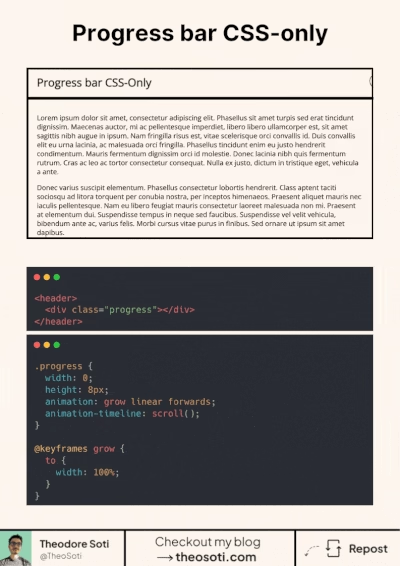
Use only CSS for progress bar
A progress bar is a perfect example of what’s possible with modern CSS. It leverages the power of animation-timeline: scroll();, which links the animation’s progress directly to your scroll position.
As you scroll down the page, the progress bar fills up in perfect sync with your movement. It’s a subtle but effective way to enhance the user experience.
CSS keyframes also play a crucial role, defining the animation’s behavior. In this case, a simple width change from 0 to 100%.
The result? A smooth, natural animation that feels intuitive and performant.
Plus, CSS animations are:
- Performant (hardware-accelerated)
- Accessible
- Great for reducing JavaScript dependencies
The only downside for now is the browser support. The support for animation-timeline is currently around 73%.
I talk about CSS scroll animations in one of my blog posts. If you want to deep dive into this subject, you can check it out here: https://lnkd.in/eX-tmD6V
<header>
	<div class="progress"></div>
</header>
.progress {
background: #55ad9b;
width: 0;
height: 8px;
animation: grow linear forwards;
animation-timeline: scroll();
}
@keyframes grow {
to {
width: 100%;
}
}Scroll-linked progress is useful when it reflects real reading position and does not distract. Keep the indicator thin and calm, then verify that long and short articles produce consistent feedback.
This pattern has the best payoff when documented with one clear usage rule. Consistent adoption turns small CSS features into reliable system behavior.
If you liked this tip, you might enjoy the book, which is packed with similar insights to help you build better websites without relying on JavaScript.
Go check it out https://theosoti.com/you-dont-need-js/ and enjoy 20% OFF for a limited time!