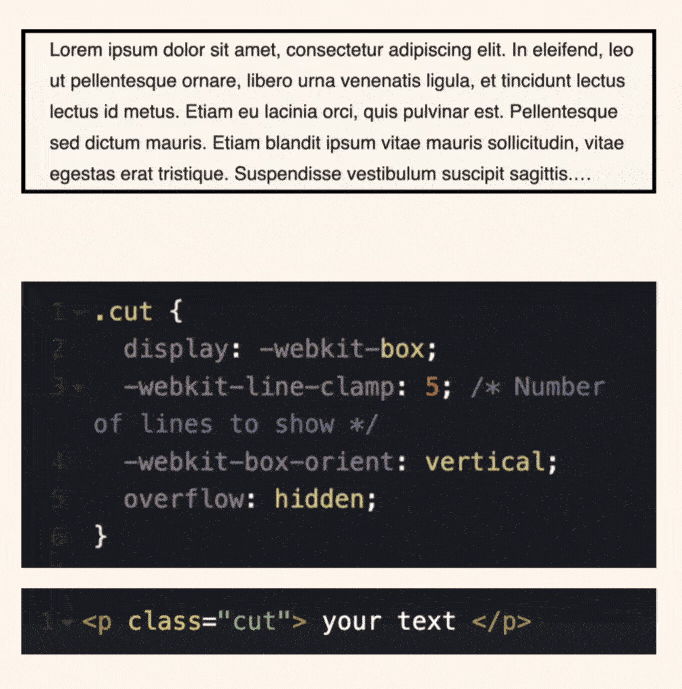
Have you ever had trouble creating multiple line breaks?
Here is a cool CSS hack that cuts your text smartly.
Simply add few lines of CSS to implement multiline truncation with ellipsis.
Here’s what you need:
display: -webkit-box;
-webkit-line-clamp: 3;
-webkit-box-orient: vertical;
overflow: hidden;
This CSS class will limit text content to three lines and hide the rest cut off content.
To break it down:
- display: -webkit-box = creates a flexible block container, similar to flexbox
- webkit-line-clamp = limits the number of visible lines.
- webkit-box-orient = ensures the content flows vertically.
- overflow: hidden = keeps things clean by hiding the rest of the text.
The result? Cut-off text that does not end colons. It’s ideal for cards, previews or anywhere space is tight.
The best part? It has more than 96% browser support!
Checkout the codepen: https://codepen.io/theosoti/pen/GgKJrwq
Multi-line truncation is most useful in cards and previews where heights must stay aligned. Choose clamp values per breakpoint and provide a full-text view so users can access hidden content when needed.
Line clamping is most useful for card grids where consistent heights matter. Pair truncation with accessible full-text paths so users can still access complete content.
Test with multilingual strings and varied word lengths. Typographic CSS should remain graceful when content is unpredictable.
A practical way to adopt truncate multiline text is to scope it to one high-impact component first. This keeps implementation predictable and prevents style drift as the codebase grows.
If you liked this tip, you might enjoy the book, which is packed with similar insights to help you build better websites without relying on JavaScript.
Go check it out https://theosoti.com/you-dont-need-js/ and enjoy 20% OFF for a limited time!