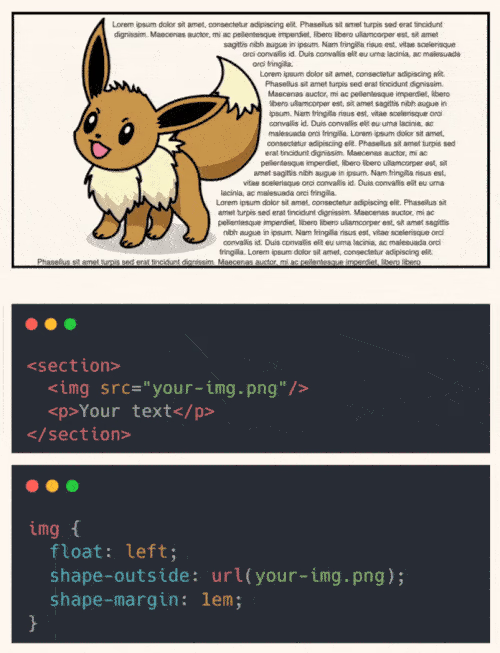
Make your text wrap around images perfectly.
By default, text wraps around a boring rectangle. But what if you could make it hug the actual shape of the image?
You can. With just one CSS property:
shape-outside: url(your-img.png);
Add a float and a bit of margin with shape-margin,
and your layout feels instantly more refined.
No JavaScript. No layout hacks. Just native CSS support and it’s supported in over 95% of browsers.
Use it with transparent PNGs, SVGs, or even basic shapes like circle() or polygon().
Ideal for editorial layouts, landing pages, or any design that needs more personality.
Checkout the codepen: https://codepen.io/theosoti/pen/ogjjged
shape-outside can produce elegant editorial layouts when image silhouettes stay simple. Test long paragraphs and varied image ratios, because float-based wrapping can become fragile in edge cases.
shape-outside can create editorial layouts with strong flow, but test with varied image sizes and long text. Float-based wrapping can break faster than block layouts.
Use this as a readability tool, not only a visual effect. The best result is when style improves scanning speed without adding cognitive load.
To roll this out safely, start by applying shape-outside: url(your-img.png); in a single UI surface where the benefit is obvious. Then reuse that same pattern in similar contexts so behavior stays consistent and review time stays low.
Before shipping, test shape-outside: url(your-img.png); with both short and long content, then verify behavior in narrow and wide containers.
If you liked this tip, you might enjoy the book, which is packed with similar insights to help you build better websites without relying on JavaScript.
Go check it out https://theosoti.com/you-dont-need-js/ and enjoy 20% OFF for a limited time!