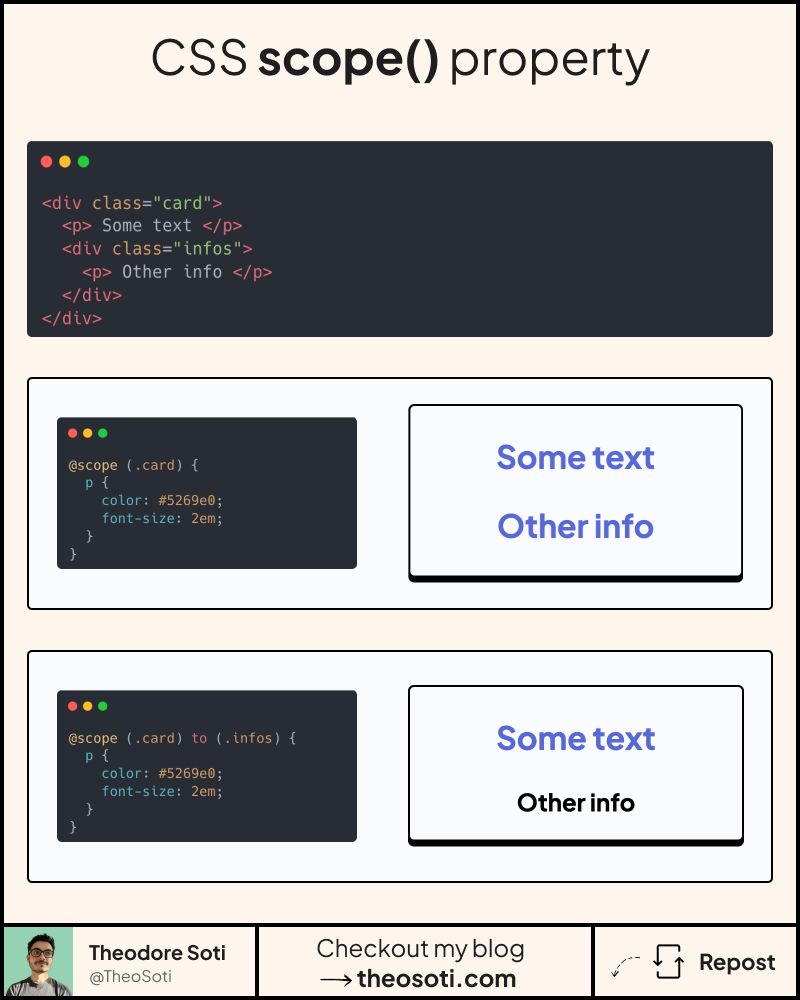
Ever felt like your CSS is leaking all over the place?
You’re not alone, it’s a familiar pain.
But now, we have @scope.
It lets you define where your styles begin, and where they end.
Think of it like local styles, without the need for CSS-in-JS, BEM, or tons of utility classes.
@scope (.container) to (.post) {
  p {
    color: blue;
  }
}
That p won’t be styled if it’s inside .post. Simple and clean.
Here’s why this matters:
- Styles don’t leak outside components
- Fewer class names, cleaner HTML
- Control over specificity and proximity
- Donut scopes (yes, really)
Even better, you can nest scopes. You can keep styles modular without naming gymnastics.
This is real encapsulation, built into CSS itself. If you’ve ever wished CSS had better boundaries, this is it.
The only downside is its browser support with only 86.56%.
@scope helps contain styles close to their component boundary without extra wrapper classes. It is especially useful in content-rich pages where broad selectors might leak into unrelated sections.
@scope helps isolate styles without additional wrappers. It is useful in content-heavy pages where broad selectors can accidentally leak into unrelated sections.
Layout features like this provide real value when components move between narrow and wide containers. Testing nested contexts early prevents brittle breakpoint rules.
When introducing @scope, begin with one reference component and treat it as the canonical pattern. This keeps implementation predictable and prevents style drift as the codebase grows.
Document each scoped root clearly so future contributors can trace where styles start and where they are intentionally blocked.
If you liked this tip, you might enjoy the book, which is packed with similar insights to help you build better websites without relying on JavaScript.
Go check it out https://theosoti.com/you-dont-need-js/ and enjoy 20% OFF for a limited time!